Customize the chat widget
Make the chat widget match your brand before it goes live. You can change its color, position, welcome message, and more, and every change shows instantly in the live preview next to the settings.
- Open RagChat and go to Settings → Widget.
- Adjust the settings described below. The preview on the right updates as you type.
- Click Save.
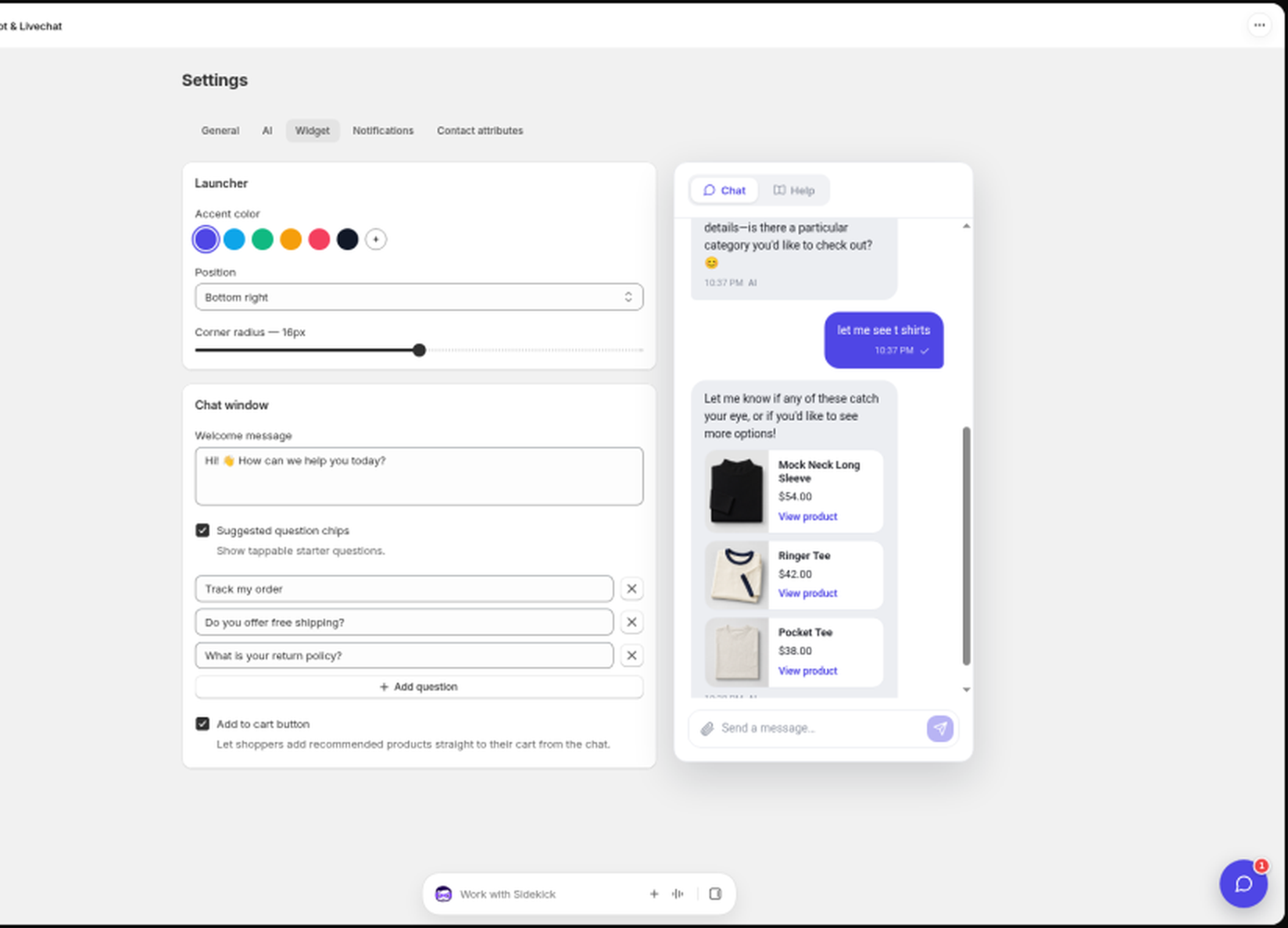
Launcher
The launcher is the round chat button visitors see on your storefront.
- Accent color: pick one of the presets or set your own. The default is indigo.
- Position: Bottom right or Bottom left of the page.
- Corner radius: a slider from 0 to 32 pixels that controls how rounded the widget looks.
Chat window
- Welcome message: the first message shoppers see. The default is "Hi! 👋 How can we help you today?"
- Suggested question chips: quick questions shoppers can tap instead of typing, shown at the start of a chat. Add up to 6. Turn the toggle off to hide them.
- Add to cart button: when on, product cards the AI shares include an Add to cart button, so shoppers can add a recommended product without leaving the chat. This is off by default.
Widget tabs
When a visitor opens the widget, they start on Chat. Extra tabs appear only when there is something to show:
- Help: help-center articles, when your help center is published.
- Updates: your public changelog (newest entries first, with new / improved / fixed badges), when the help center is published and has at least one published changelog entry. Visitors can open the full changelog page from a link at the bottom.
If there is nothing to show for Help or Updates, visitors only see Chat, same as before. Shopify stores that do not use a RagChat help center stay on Chat only. The live preview on Settings → Widget follows the same rules, so you can confirm which tabs visitors will get.
On very small screens, tab icons hide so the labels still fit next to the close button.
Mobile behavior
You do not need to configure anything for mobile. On small screens the chat opens full screen automatically and closes back to the launcher.
Once you are happy with the look, make sure the widget is actually live on your theme. See Set up RagChat on your Shopify store.
Still stuck? Message us from the chat widget and we'll help.