Enable external access
Enable external access so you can sign in outside the Shopify admin, connect AI clients like Claude, and invite teammates who don't have Shopify access.
Set it up
- Open RagChat and go to Settings → Team.
- In the External access card, enter Your name, Email, and a Password (at least 8 characters).
- Click the Enable external access button. This is a one time setup, not a switch you turn on and off.
- Check your inbox and verify the email before you sign in the first time.
Already have a RagChat sign-in? Use the same email and password.
Once it's set up, you can work your inbox at app.ragchatai.com/login and connect AI clients. See Manage RagChat from an AI client (MCP).
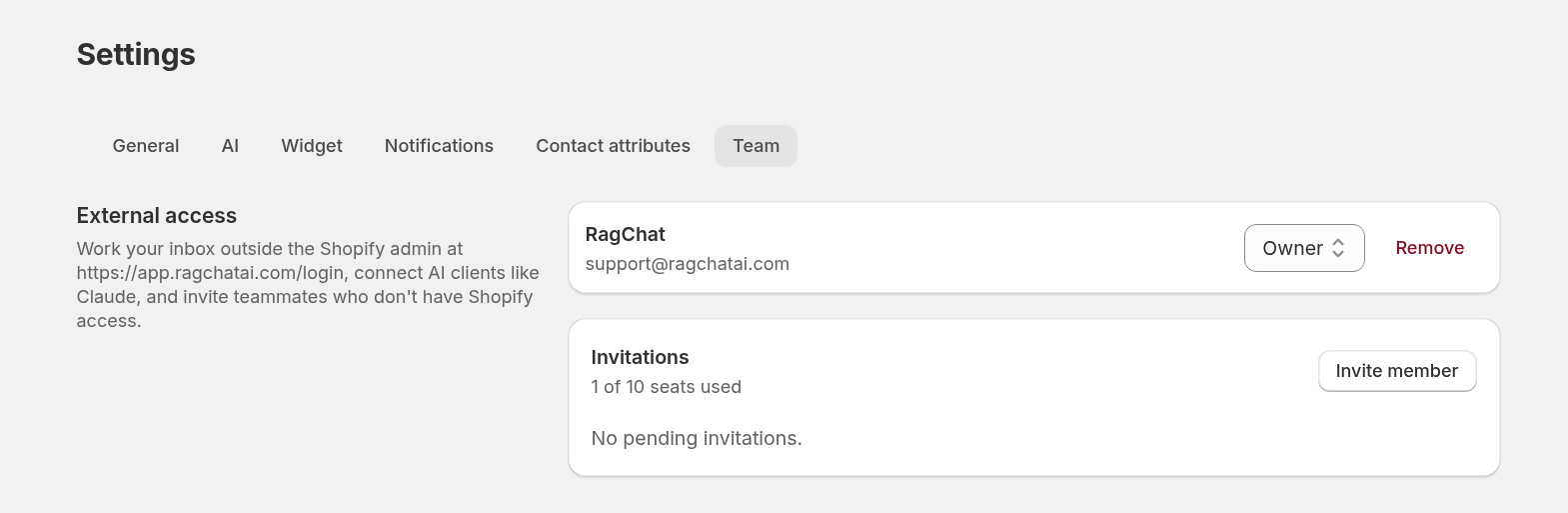
After setup, Settings → Team shows the External access card with your members. Each member has a role dropdown (Owner or Agent) and a Remove button. Below it, the Invitations card shows your seat usage, the Invite member button, and any pending invitations.
Invite teammates
Owners can invite people who don't have Shopify access.
- Go to Settings → Team.
- Click Invite member.
- Enter their email and pick a role: Owner (manages members and settings) or Agent (works the inbox).
- Click Send invitation.
The Invitations card shows how many seats you use (for example, "1 of 10 seats used"). A seat is a member or a pending invite that hasn't expired. Your Shopify admin sign-in does not take a seat.
Team seats by plan
| Plan | Seats |
|---|---|
| Free | 1 (you, so you can still connect Claude) |
| Standard | 3 |
| Pro | 10 |
When you're at the limit, Upgrade replaces Invite member and links to Pricing. Downgrading cancels the newest pending invites first. Existing members stay.
See Plans and pricing.
Still stuck? Message us from the chat widget and we'll help.