What is Edify?
Edify is a bulk editor for your Shopify catalog. You pick the items you want to change with filters, choose your edits, check the preview, then apply everything at once or schedule it for later.
What you can do with Edify
- Edit products, variants, and collections in bulk across catalog fields including titles, prices, SEO, inventory, metafields, and Google Shopping attributes. See Fields you can edit in bulk.
- Change prices and compare-at prices by an amount or a percentage, or round them to endings like $X.99. Edit every variant of the products you pick, or only specific variants. See Bulk edit prices and compare-at prices.
- Set or clear product and variant metafields. See Bulk edit product and variant metafields.
- Change inventory quantity at a chosen location. See Bulk edit inventory quantity by location.
- Update image alt text, including copying the product title or filling only empty alts. See Bulk edit image alt text.
- Rename product options and option values across many products, for example Colour to Color. See Rename variant options in bulk.
- Set or remove Shopify's standard Product category on many products at once. See Fields you can edit in bulk.
- Turn Charge tax on or off for many variants at once. See Fields you can edit in bulk.
- Target the right items with searchable filters such as collection, vendor, tag, product type, status, price, inventory, option name or value, and charge tax, and combine them with AND or OR. See Choose which products to edit with filters.
- Run several edits in one task, for example change titles and add a tag together.
- Preview which items match before anything changes.
- Schedule an edit for later and revert it automatically, which is handy for sales.
- Export products to a CSV file, edit it in a spreadsheet, and import the changes. See Export and import products with CSV.
- Save a bulk edit to run again in one click, or daily, weekly, or monthly. See Save a bulk edit and run it again or on a schedule.
- See the old and new value of every edited item in History, export the change log as CSV, and undo a whole task with one click. Verified reverts can be retried if some items fail. See View history and undo an edit.
How Edify is organized
| Page | What it's for |
|---|---|
| Dashboard | Setup Guide, your stats (Total Tasks, Products Edited, Success Rate), quick actions, and Recent tasks with View all tasks |
| Bulk Edit | Build an edit: what to edit, filters, actions, preview, then Run now or Schedule |
| Saved tasks | Bulk edits you saved, to run again by hand or on a schedule |
| History | Every task with its status, progress, and the old and new values it changed. Revert, retry, cancel, or delete tasks here |
| Import & export | Export products to CSV and import your edited file |
| Plans | Your plan, monthly usage, and upgrading to Pro |
| Settings | Your current plan, app language, and the timezone used for scheduled edits. Need help? Contact support. is at the bottom of every page |
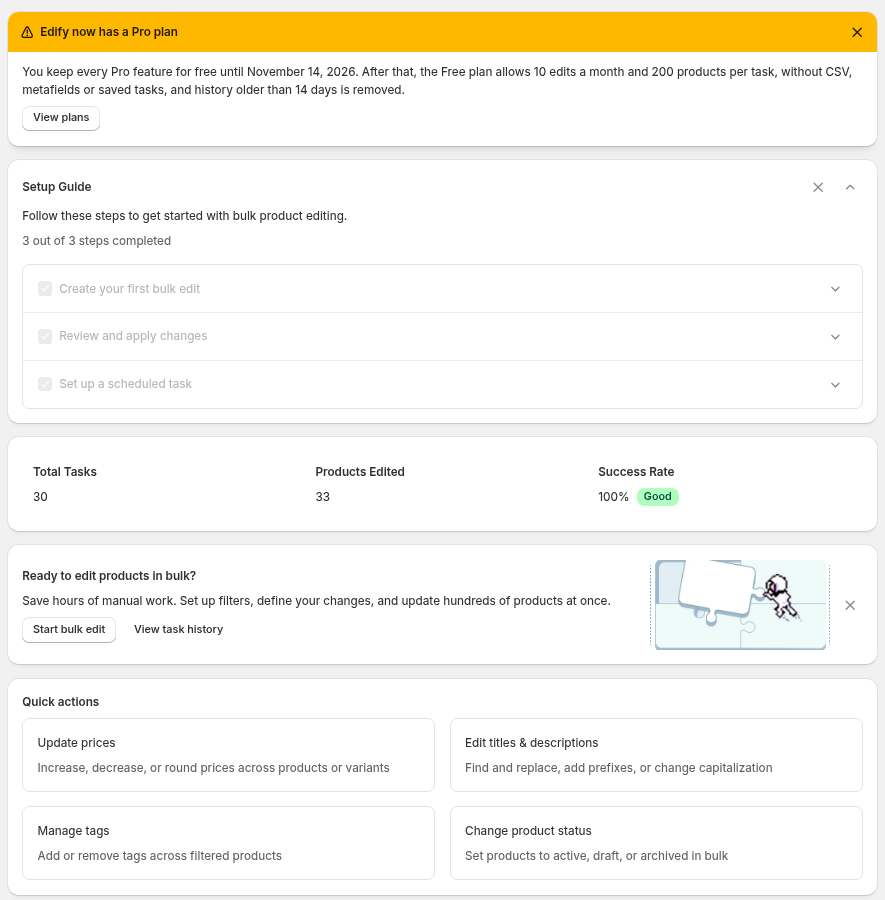
The Setup Guide on the Dashboard tracks three steps: create an edit, finish one, and schedule one. Steps tick automatically from your real tasks (including deleted ones), so shops that already ran edits are not stuck at 0/3. You can still mark a step done by hand if you prefer.
The Quick actions on the Dashboard are shortcuts. Update prices, Edit titles & descriptions, Manage tags, and Change product status each open Bulk Edit with a starting setup for that job, all with Products selected. For example, Update prices picks Price for you.
Good to know
- Edify has a Free plan and a Pro plan. CSV, metafields, saved and scheduled tasks, and auto-revert are on Pro. See Is Edify free?
- Edify edits catalog details. It doesn't change orders, or tax settings other than Charge tax on variants. See What Edify can and can't edit.
- The app is available in English, German, Spanish, French, and Portuguese. Change it in Settings → App language.
Next step
Follow Make your first bulk edit to run your first task in a few minutes.
Still stuck? Message us from the chat in the app and we'll help.