Run several edits at once
One Edify task can apply several edits to the same items. For example, you can update product titles and add a tag in a single run.
Add more actions
- In Bulk Edit, set up What to edit and your filters.
- Fill in the first action in Edit actions.
- Click Add action. A new row appears.
- Pick the Field, Operation, and value for the new row.
- Repeat for as many edits as you need.
- To remove an action, click the trash icon on its row.
- Type a Task name, check the Preview, then click Run now or Schedule.
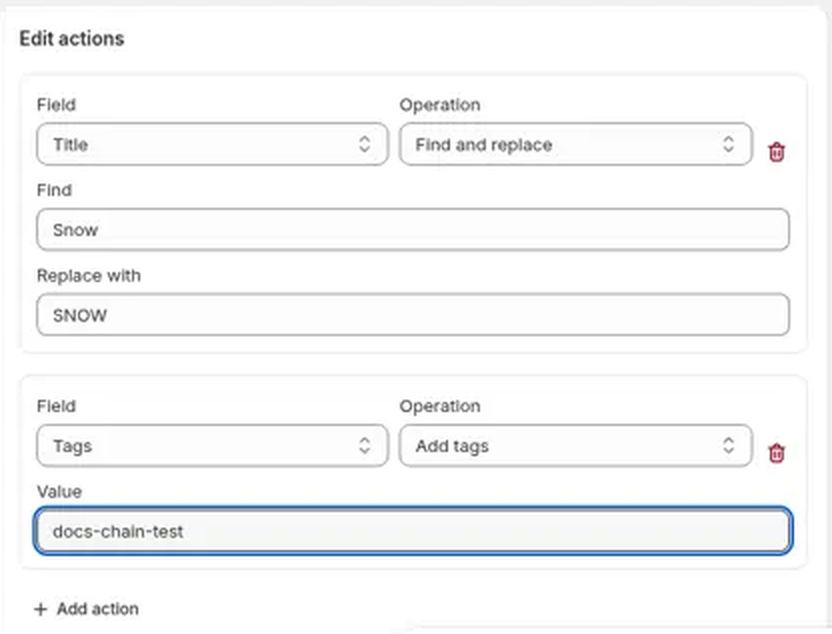
How chained actions work
- Actions run in order, from top to bottom. Actions on different fields each change their own field.
- Actions on the same field stack. Each one starts from the result of the one above it. For example, Price Decrease by % 10 then Price Round price $X.99 turns $25.00 into $22.99. Order matters, so put them in the order you want them applied.
- The Preview and History show one line per field, from the original value to the final value, and the badge counts that field once. If the actions cancel out, such as Increase by amount 5 then Decrease by amount 5, the item isn't changed.
- Every action uses the same filters and the same What to edit choice.
- With Products, one task can change prices and product fields together, for example lower the price and add a sale tag. The price edit applies to every variant of each matched product.
- Every action needs a value before the task can start. Change capitalization and Round price use the option you pick, Find and replace needs text in Find, and Rename needs both the current and the new name. If a box is empty, Edify marks it This field is required and doesn't start the task. If a value is only spaces, a red banner at the top of Bulk Edit says Each edit action needs a value.
- Reverting the task undoes all of its actions together and puts back each field's original value. See View history and undo an edit.
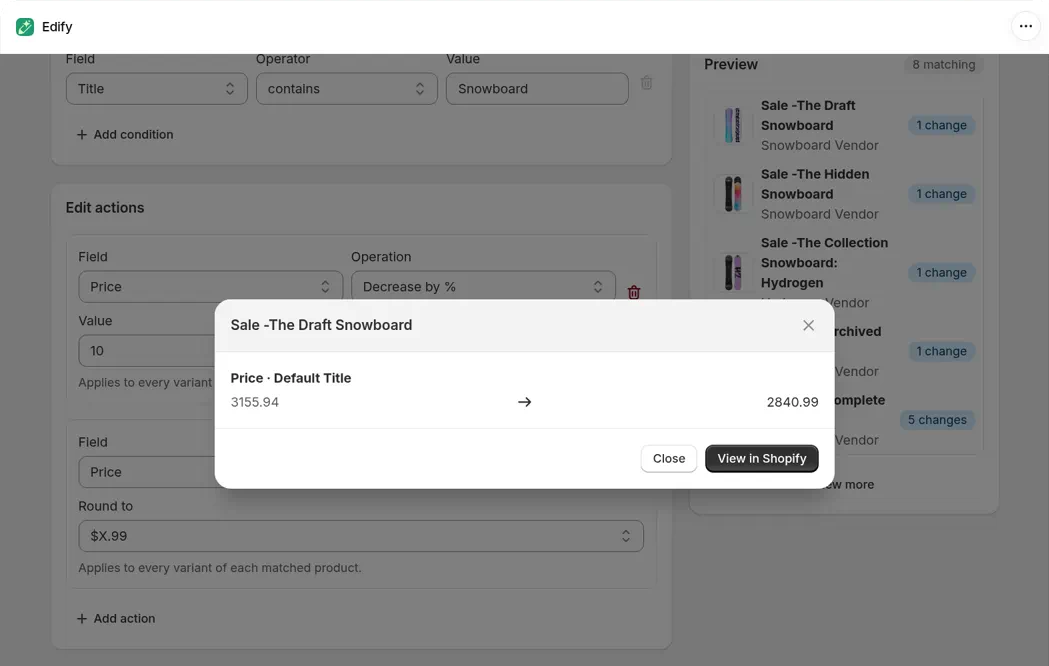
10% off, then round to .99, takes 3155.94 to 2840.99, shown as one line.
Ideas
- Price, Decrease by % 20, then Price, Round price $X.99, to discount and round in one task. See Bulk edit prices and compare-at prices.
- With Products: Price, Decrease by % 20, then Tags, Add tags
sale, to discount and tag sale products in one go. See Bulk edit prices and compare-at prices. - Title, Add text to end, then Tags, Add tags, to label and tag a collection in one go.
- Option name, Rename Colour to Color, then Option value, Rename Grey to Gray with Only in option Color, to tidy an option and its values in one go. See Rename variant options in bulk.