I can't find Price in the field list
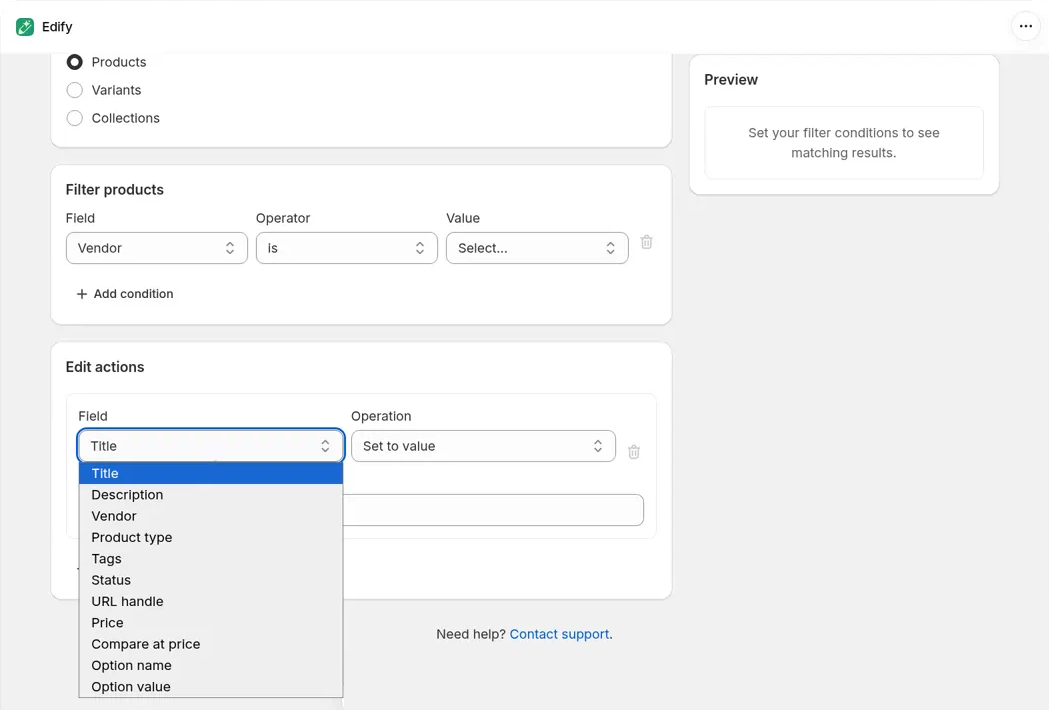
Price and Compare at price are in the Field list when Products or Variants is selected under What to edit. Collections don't have prices, so they don't appear when Collections is selected.
Fix it
- In Bulk Edit, under What to edit, choose Products (to change every variant of the products you pick) or Variants (to change specific variants, for example by SKU).
- Add your filters.
- In Edit actions, open Field and choose Price or Compare at price.
Shortcut: the Update prices quick action on the Dashboard opens Bulk Edit with Products and Price already picked.
Still don't see them? If Edify was already open in your browser, reload the page and try again.
Which one should I pick?
- Products changes the price of every variant of each matched product, using each variant's own price. A note under the action says Applies to every variant of each matched product.
- Variants changes only the variants that match your filters, for example by SKU, Barcode, or Price. Each filter is checked on the variant, so a Price filter changes only the variants in your range. Keep AND when you use a Price filter here.
For step-by-step price edits, rounding, and sales, see Bulk edit prices and compare-at prices.
Still stuck? Message us from the chat in the app and we'll help.