How add-ons appear in the cart and at checkout
Wondering what your customers actually see after picking paid options? Here's the flow from product page to order.
On the product page
As the customer selects paid option values, the displayed product price updates to include the add-ons.
Buy it now and accelerated checkout
When a product has an Optionize option set, Buy it now, Shop Pay, Apple Pay, Google Pay, PayPal, and other accelerated checkout buttons are hidden on that product page.
Shopify's native accelerated checkout sends the variant straight to checkout and skips the product form. Option selections (line item properties) would be lost, so Optionize keeps shoppers on Add to cart instead.
Shop Pay, Apple Pay, Google Pay, and PayPal still work from the cart and at checkout. By then the cart line already has the options attached.
Products without an option set keep their normal product-page accelerated checkout buttons.
Collection and search quick-add
Many themes let shoppers add a product from a collection or search results page without opening the product page first (quick-add, add to cart, or a slide cart).
If that product has an Optionize option set with at least one Required option, Optionize sends the shopper to the product page instead. They can fill in the required options there, then add to cart as usual. Themes that show cart errors may briefly show "Choose your options on the product page" while the page changes. You can translate it; see Translate your options widget.
If every option in the set is optional (none marked Required), theme quick-add keeps working. The shopper can add the product from the collection or search page without being redirected.
To make collection or search quick-add redirect for a product, mark at least one option as Required in the option set. See Configure an option's settings.
In the cart
The cart shows the main product with the customer's selected options listed as line item properties, for example "Engraving: Happy Birthday". Option names come from the Option name you set on each option.
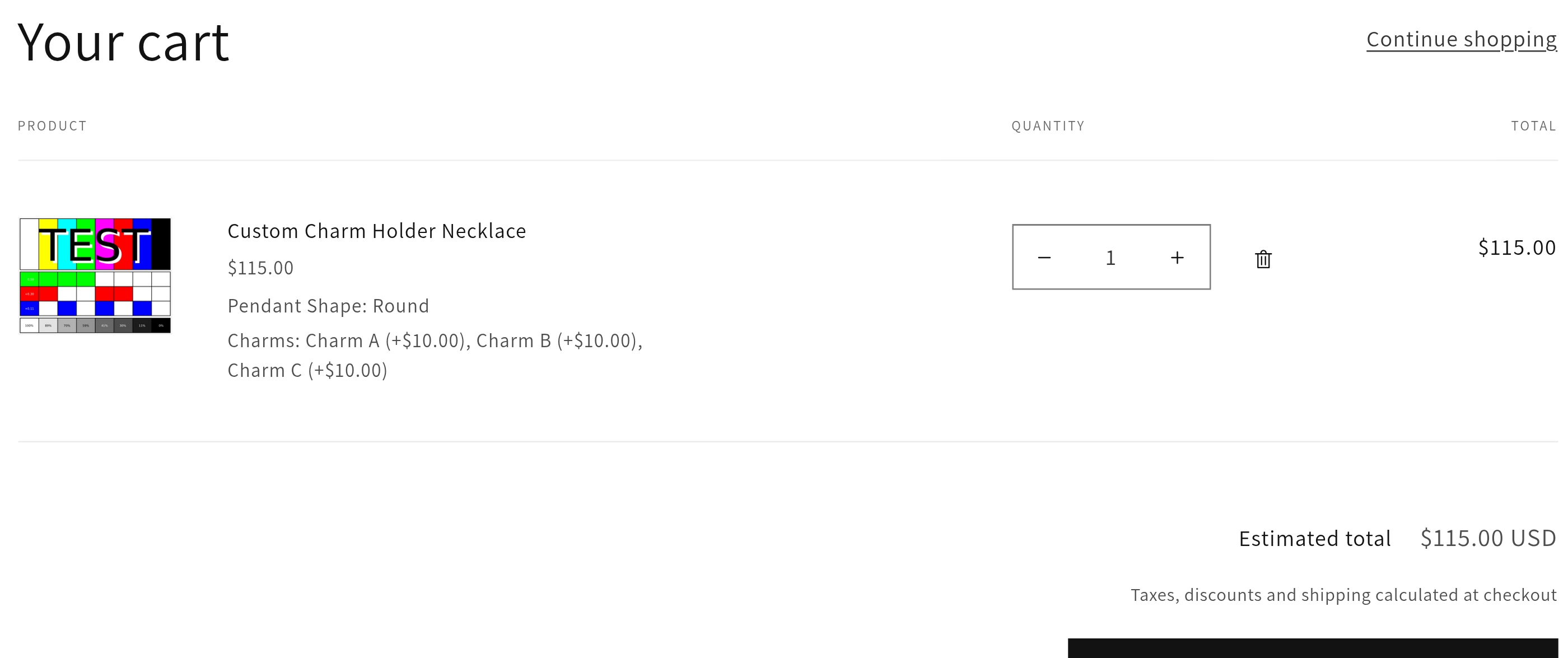
Shopify treats lines with different properties as separate, even when the variant is the same. Two of the same product with different personalisation names (or one personalised and one not) stay as two cart lines. That is normal Shopify behavior. Some third-party Spend & Save apps struggle with it; native Shopify automatic discounts do not. See Shopify discounts are applied to my add-on prices.
Complementary and recommended products
Shopify complementary products (Search & Discovery) and other recommended cards on the product page have their own add-to-cart buttons.
Those buttons add only that complementary product. They do not attach this product's Optionize options or add-on prices. If a shopper wants both, they add the main product and the complementary product separately.
A required option left empty on the main product also does not block adding a complementary product.
At checkout and on the order
Each paid add-on becomes its own line item with its price, next to the main product. This is how Shopify charges for the add-on amounts, and it means:
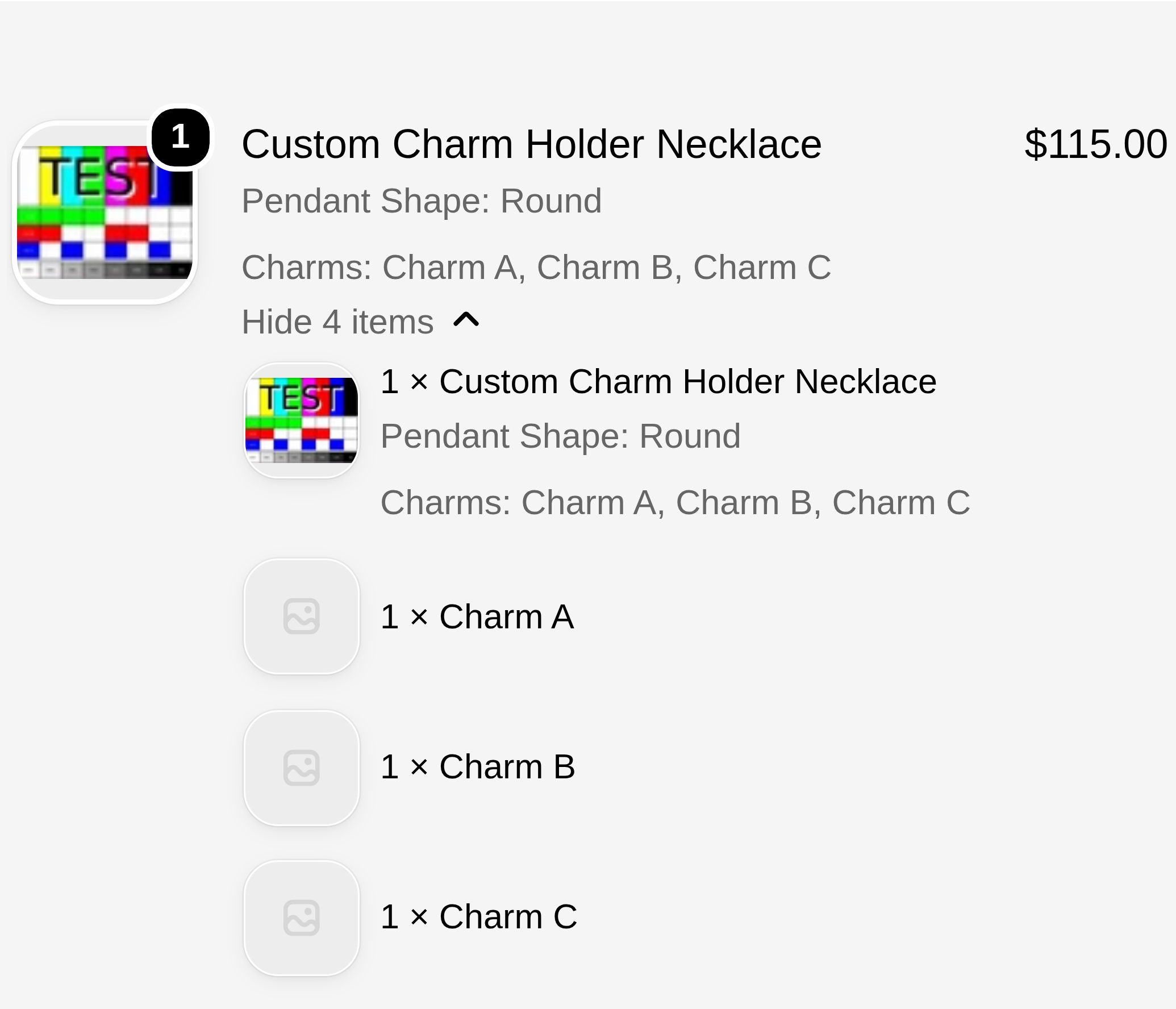
- the customer sees a transparent breakdown of what they're paying for
- your order in Shopify admin lists the main product plus each add-on
- fulfillment staff can see the exact selections on the line item properties
- Shopify Tax on those add-on line items follows Add-on products require shipping in Settings. Keep it on for physical products so tax matches the main product. Turn it off only for services or digital goods. With it on, add-on lines may also show in your shipping profile and in 3PL or fulfillment apps. See Add-on products require shipping, Charge add-on prices for options and Customize the widget with settings, CSS, and JavaScript.
One side effect of this bundling: a Shopify discount on the main product is spread across the add-ons too. See Shopify discounts are applied to my add-on prices.
On the packing slip
Shopify's default packing slip template doesn't print line item properties, so the selections won't appear there until you add them yourself. See Show options on your packing slip.
On the customer's account
After purchase, customers can see their selected options on the order status page and in their order history.
Related: Charge add-on prices for options and Hidden Optionize products in my Shopify admin.