Configure an option's settings
Every option in an option set has its own settings panel. This article explains what each setting does so you can fine-tune how options look and behave.
Naming
- Option name: a unique name for the option. Customers see it next to their choice on the cart page, and it's how the selection appears on the order.
- Option label: the label shown above the option on the product page. Turn on Hide label if you don't want a label at all.
Keep both clear and short. "Engraving text" beats "Custom input 1" on both the product page and the order.
Behavior
- Required: customers must fill in or select this option before they can add the product to the cart.
- Default value: pre-fills the option. For choice options you can instead mark one value as selected by default. (Dimension has no default-value field; the editor hides it.)
- Placeholder: hint text inside empty text-style inputs.
- Help text: a short line under the option.
- Info: a tooltip icon next to the label with extra guidance.
Layout
- Width: how much of the row the option takes up: 25%, 33%, 50%, 66%, 75%, or 100%. Two options at 50% sit side by side.
Validation
The available limits depend on the option type:
| Option types | Settings |
|---|---|
| Text box, Text area, Email | Min character and Max character |
| Number box, Date picker, Time picker | Min value and Max value |
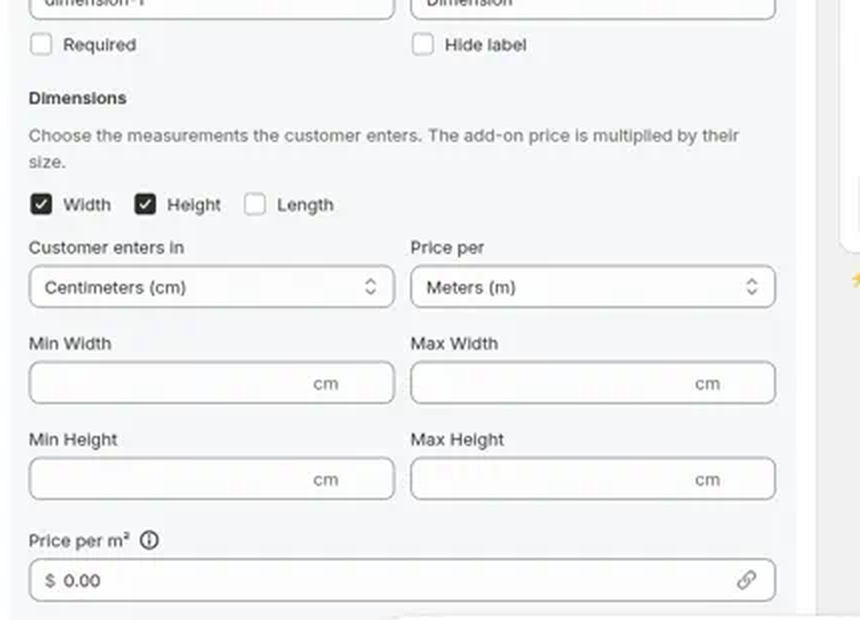
| Dimension | Min and Max per enabled field (Width, Height, Length). 0 means no limit. |
| Checkbox, Radio button, Button, Color swatch, Image swatch | Limit selected values with Min and Max selected values |
File upload has no validation settings. Its 5 MB size limit is fixed and it accepts any file type. See Collect file uploads from customers.
Type-specific settings
- Dimension: which of Width, Height, and Length the customer enters (at least one); Customer enters in and Price per (mm, cm, m, in, ft, or yd); and the rate under Price per m² (label updates with field count and price unit). One field prices by length, two by area (²), three by volume (³). See Option types you can add.
- Switch: Enabled by default, plus custom On label and Off label (default "Yes" and "No").
- Heading: the heading text and level (h1 to h6).
- Divider: color and style (solid, dashed, dotted).
- Spacer: height in pixels.
- Paragraph, Modal, Html: the content itself, edited in place.
Conditional logic (Pro)
Show or hide the option based on what the customer picked in other options. See Show or hide options with conditional logic.