Automatically sync new reviews
Keep your imported reviews fresh. When auto-sync is on for an import URL, WiseReviews regularly checks the source page and pulls in any new reviews for you.
Auto-sync is available on the Standard and Plus plans. See Plans and pricing.
Supported platforms
Auto-sync works with every source you can import by URL:
- 1688
- AliExpress
- Alibaba
- CJdropshipping
- DHgate
- eBay
- Etsy
- HktvMall
- Lazada
- Shop App
- Tokopedia
- Walmart
- Wish
Amazon, Shopee, Shein, and Temu imports can't auto-sync. They are CAPTCHA-protected, so our server can't revisit their pages; reviews from these sites are imported through the Chrome extension, and you can re-run that import whenever you want the latest reviews.
Turn on auto-sync for an import
Auto-sync is set per import URL, when you import:
- Go to Reviews and click Import reviews.
- Fill in the import as usual (see Import reviews from AliExpress and other marketplaces). Pick up to 5 products with Pick products if you want synced reviews on more than one product.
- Tick Automatically sync new reviews before clicking Import. If the URL has no reviews yet, the button becomes Save auto-sync instead (see below).
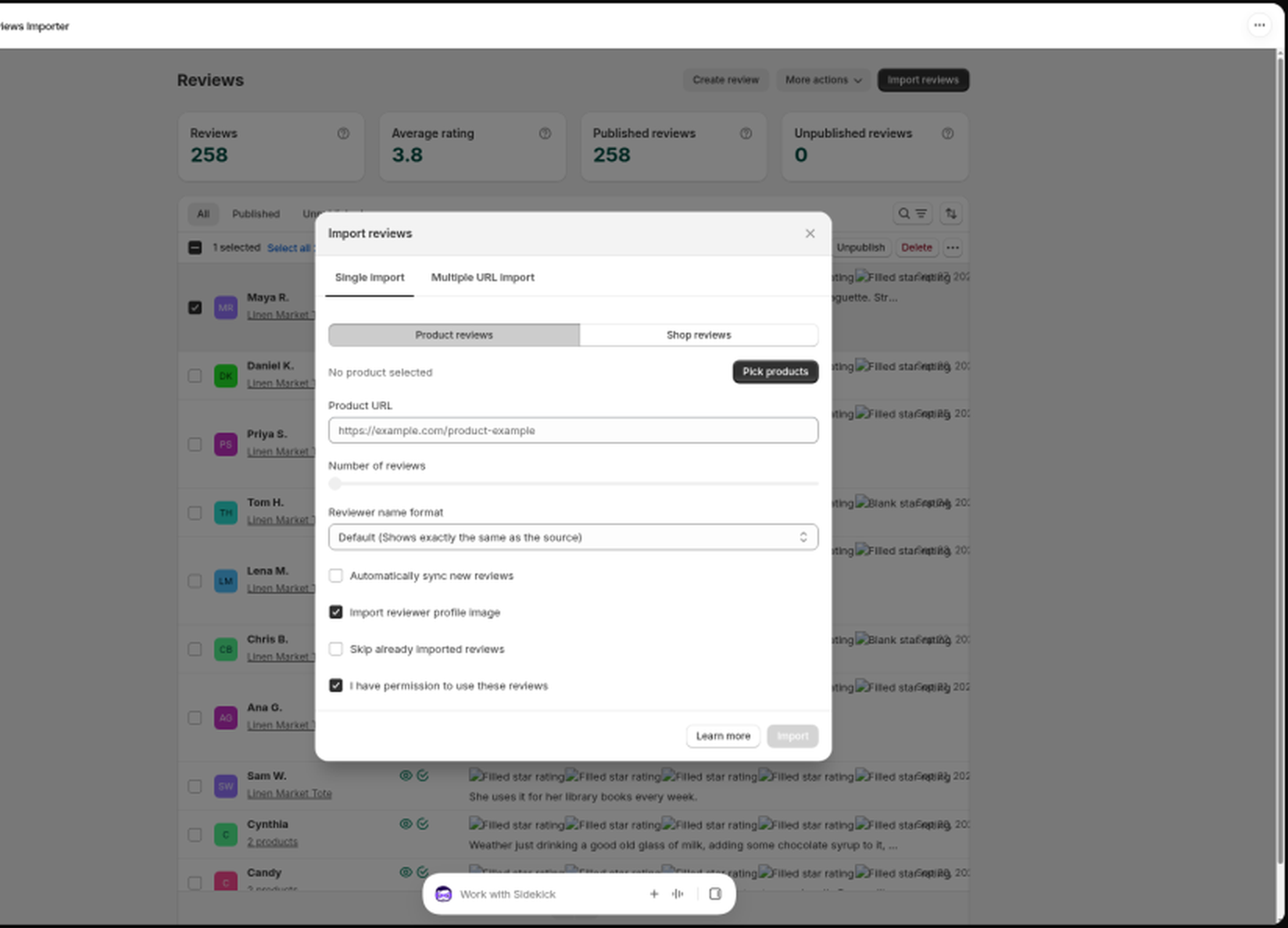
The synced URL remembers every product you picked. New reviews found later land on all of them.
Save a listing that has no reviews yet
On Standard or Plus, you can save a marketplace URL for auto-sync even when it currently has zero reviews:
- Go to Reviews and click Import reviews.
- Fill in the product(s) and paste the URL as usual. Wait for validation.
- When the modal says there are no reviews, tick Automatically sync new reviews.
- Click Save auto-sync (the Import button changes to this label).
The URL appears under Synchronized reviews as Pending, with no empty syncs counted yet. WiseReviews will pull reviews in when the listing gets some. After three empty syncs on the normal schedule, it pauses, same as any other empty synced URL.
You cannot save extension-only sources (Amazon, Shopee, Shein, and Temu) this way. Use the Chrome extension when those listings have reviews.
On the Plus plan, a Multiple URL import CSV row with zero reviews and auto_sync_import set to 1 is also saved as a Pending sync URL. See Import reviews from AliExpress and other marketplaces.
How often does it sync?
Each synced URL is re-checked roughly every two weeks. The exact timing varies to spread the load, and it can't be triggered manually.
Need the newest reviews right now? Just re-import from the same URL and tick Skip already imported reviews; only the new reviews are added.
Manage your synced URLs
- Go to Reviews, open More actions, and click Synchronized reviews.
- The list shows each synced URL with its Product, URL, Last synced time, and Last status:
- Synchronized: the last sync found reviews and succeeded.
- No reviews: the source page was reachable, but it currently has no reviews to import.
- Failed: the last sync could not fetch the page (for example the link changed or the site blocked the request).
- Paused: syncing is stopped for this URL.
- Pending: waiting for the next sync run (for example right after you resume a URL, or right after you save a zero-review URL with Save auto-sync).
- Select one or more URLs, then click Pause, Resume, or Delete.
The Product column shows the product name, or N products when the URL is linked to more than one. Click N products to see the full list.
Resume clears failure and empty counters and makes the URL due for the next sync run right away.
New reviews found by a sync count toward your plan's import limit and keep your original reviewer name format and review filter. Already imported reviews are always skipped automatically, so you never get duplicates.
When a product is deleted in Shopify
If you delete a product in Shopify that a synced URL still uses:
- The URL moves onto its remaining products and keeps syncing there.
- If that was the URL's only product, syncing stops for that URL.
Reviews follow the same rule. See Manage your reviews.
When syncing pauses on its own
A synced URL is paused automatically when:
- two sync attempts in a row fail (the page could not be reached), for example because the source page was removed, redirected, or is temporarily blocking requests;
- three sync attempts in a row find No reviews (the page is reachable but empty). That usually means the marketplace listing lost its reviews. Empties are spaced on the normal sync schedule, so this takes about five weeks, not a single day;
- your paid plan ends (downgrading to the Free plan pauses all synced URLs).
A brief Shopify connection blip does not pause your synced URLs. Only real Shopify answers count toward the failure path above.
Check the Last status column, fix the cause (or update the import), and use Resume to start syncing again. URLs that stay failed or paused for over 6 months are cleaned up automatically.
Still stuck? Message us from the chat widget and we'll help.