Manage your reviews
The Reviews page is your review inbox. From here you publish, feature, verify, reply to, delete, and organize every review in your store.
When you have no reviews yet
If your shop has never imported or created a review, the Reviews page shows No reviews yet instead of the filters and table. You get two shortcuts:
- Import reviews opens the same import flow as the header button.
- Contact support opens the chat widget.
Once you have at least one review, the usual tabs, filters, and table appear. A filter or search that matches nothing still uses the normal empty result, not this empty state.
Find the reviews you need
- Use the All, Published, and Unpublished tabs to switch between review states.
- Search by reviewer name, email, or review text in the search box.
- Filter by Type (Product reviews or Shop reviews), Status, Rating, Product, Media (with or without photos and videos), Source (where the review came from, like AliExpress, CSV, or Extension), and Featured.
- Sort by Date or Rating, in either direction.
The number shown above the list is how many reviews match your current tabs, filters, and search, not just how many fit on the page.
Special search filters
Type these exact phrases in the search box. They are not regular text search.
!duplicate: reviews that match another review's title, body, rating, reviewer name, and product. The list shows only the extra copies. The first copy of each set is kept and is not listed, so deleting everything listed leaves exactly one of each.!empty:title: reviews with no title.!empty:body: reviews with no body.!batch:123: reviews from that import batch. Replace123with the batch id.
An info banner appears when !duplicate is active.
Unlock Create review and Edit
Create review and Edit stay locked until Support turns on review management for your shop. Message us from the chat widget when you need them unlocked.
Delete and Delete media don't need an unlock. Every shop can use them. See Delete reviews below.
Once Create review and Edit are unlocked:
- Open the Reviews page.
- Create review is at the top of the page (next to the other header actions).
- Tick the checkbox on one or more reviews in the list.
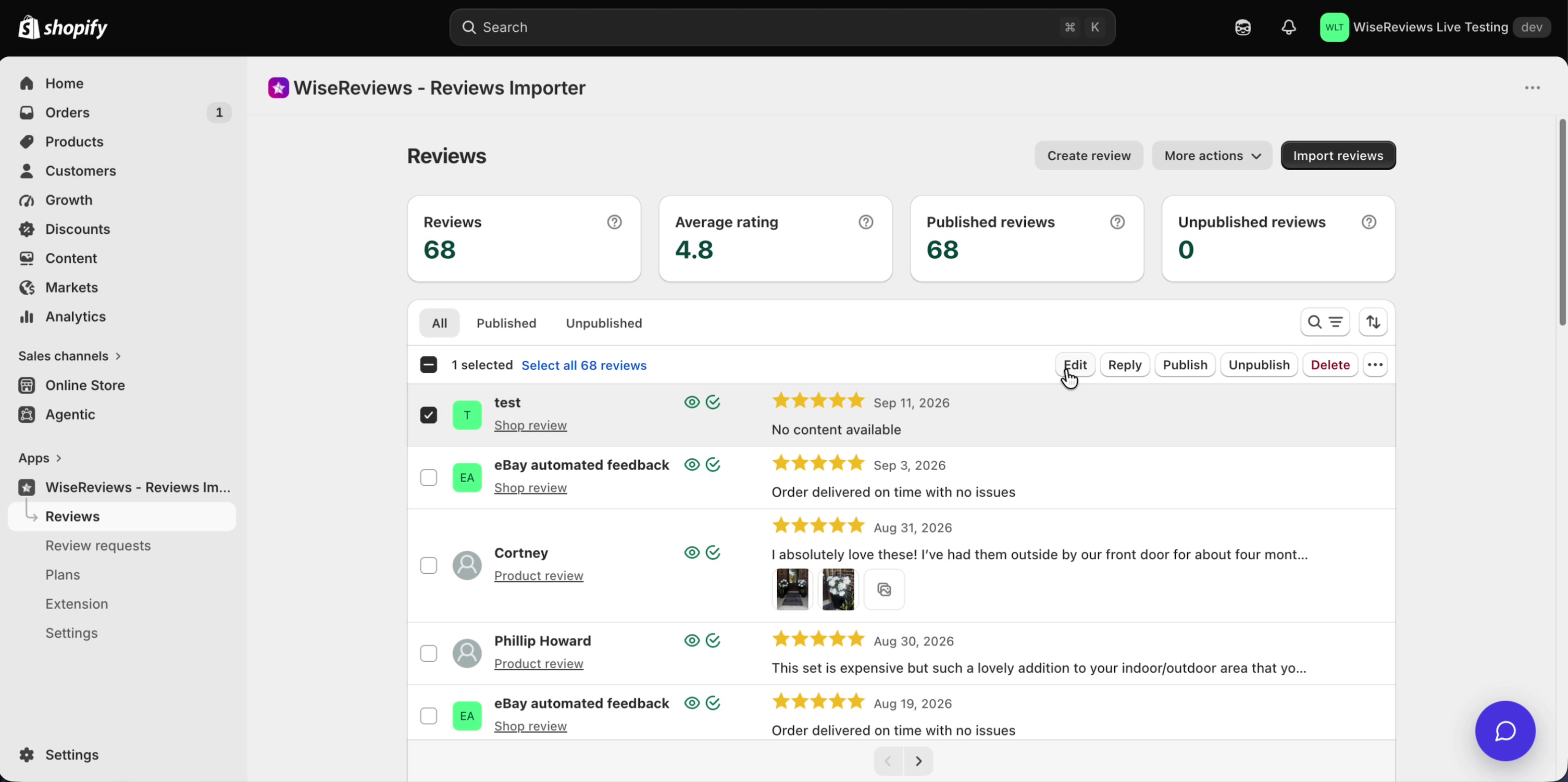
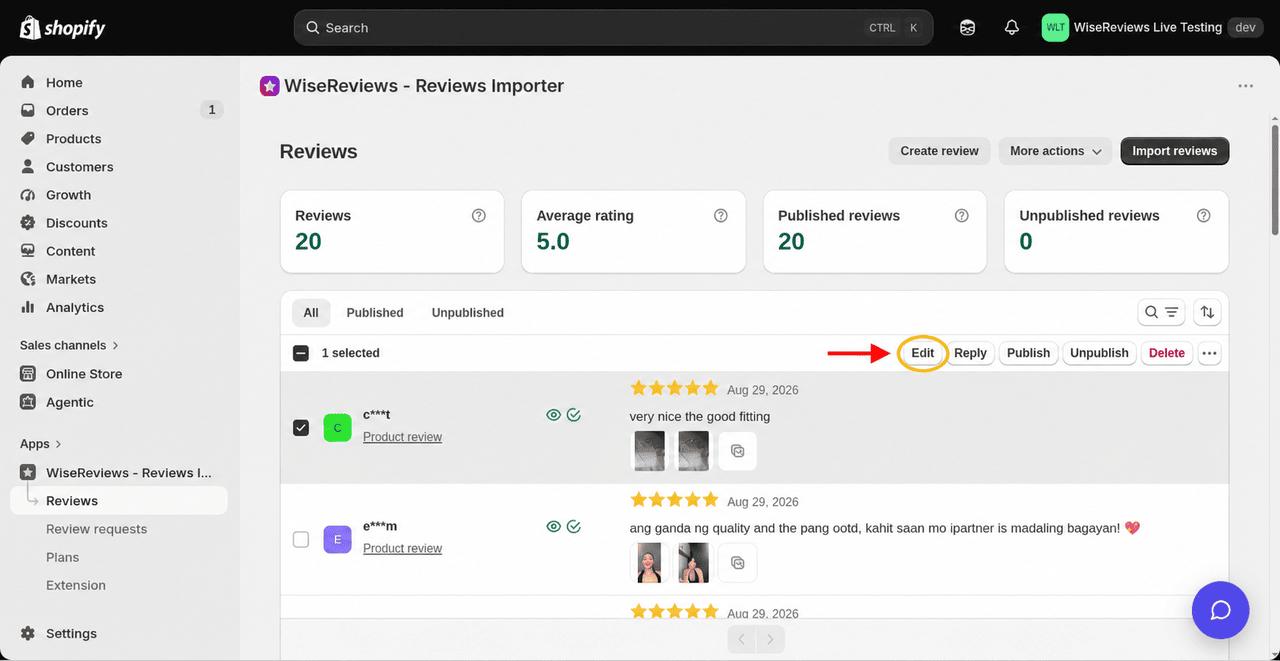
- Edit appears in the action bar above the list, next to Reply and Delete (not under More actions). Edit needs exactly one review selected.
Actions you can take
Select one or more reviews to see the available actions:
- Publish / Unpublish: control whether the review appears on your storefront. Unpublished reviews are hidden, not deleted.
- Reply: respond to a review, manually or with AI. See Reply to reviews with Magic reply.
- Edit: select one review (not several). Edit appears in the action bar above the list, not under More actions. Change the review's content, rating, date, reviewer name, products, or other details. In the Edit form, Choose language translates the review and saves it right away, keeping the original for Restore original text. See Translate one review in the review form. If you don't see Edit, message us from the chat widget and we'll unlock review management for your shop. See Unlock Create review and Edit above. There is no bulk date or name update via CSV. Re-importing an edited export creates new reviews (duplicates), it does not update the ones you already have. See Import and export reviews via CSV.
- Mark as verified / Mark as unverified: add or remove the Verified badge shoppers see next to the review.
- Mark as featured / Unfeature reviews: featured reviews appear in the Featured Reviews widget. You can feature up to 25 reviews. See Feature your best reviews.
- Assign to products: replace the selected reviews' products with the products you pick (up to 5). With one review selected, the picker opens with its current products already ticked. With several reviews selected, the picker starts empty and your pick replaces every selected review's products. The review stays a single row; edit, reply, and publish apply on every product. There are no duplicate copies.
- Convert to shop review: detach reviews from a product so they represent your shop as a whole.
- Translate reviews: translate the selected reviews' titles and text into your store's language. WiseReviews saves the original wording. See Translate reviews.
- Restore original text: put back the saved original title and text of translated reviews. It's in the ... menu at the end of the action bar. It asks you to confirm first, and any edits made after translating are lost. See Restore the original text.
- Export reviews: email yourself a CSV of the selected reviews. Exporting needs the Standard or Plus plan. See Import and export reviews via CSV.
- Delete: permanently remove the selected reviews. It's in the action bar above the list. This can't be undone. See Delete reviews below.
- Delete media: permanently remove the photos and videos from the selected reviews. The reviews stay. It's in the ... menu at the end of the action bar. See Delete review photos and videos below.
Every action applies to exactly the reviews you selected. If you selected everything that matches, it applies to those matching reviews and nothing else.
Each review row shows the product name, or N products when the review is on more than one. Click N products to open a list of those products; each one opens its storefront page in a new tab. Rows also show icons for state: an eye for published or unpublished, a check for Verified, and a pin for Featured.
Open the related Shopify order
Under the reviewer name on each row, you can jump to the Shopify order behind a review:
- View order appears when WiseReviews matched the review to an order. It opens that order in your Shopify admin.
- Find order appears on a storefront review that has a reviewer email but no match. It opens your Shopify orders list searched by that email so you can look the order up yourself.
- Imported reviews and reviews without an email show neither link.
Matching uses your review requests: the reviewer's email, orders placed before the review, and (when the customer has more than one) the order that includes the reviewed product. Cancelled orders are not matched. Past reviews are included; you do not need to re-import anything. See Send review request emails.
When you delete a product in Shopify
Deleting a product in Shopify no longer deletes its WiseReviews reviews.
- If a review (or auto-sync URL) is still linked to other products, it stays on those remaining products. Nothing is unpublished.
- If that was the review's only product, the review is unpublished and stays in your Reviews list under the Unpublished tab. On the Reviews list, those rows show Deleted product instead of a product or shop link. Use Assign to products or Convert to shop review to put them somewhere else, or Publish them again later after you reassign.
- Auto-sync URLs that also had other products keep syncing onto those remaining products. URLs tied only to the deleted product stop syncing.
- If several products are deleted close together, you get one email that lists those products and how many reviews were unpublished (only the ones left with no products, not one email per product).
- Storefront ratings for the deleted products update shortly after (usually within about 10 minutes).
Reviews already lost before this change cannot be recovered.
Delete reviews
You can delete reviews yourself. You don't need to ask Support to turn anything on.
Deleting is permanent. Reviews are not moved to a trash or an archive and there is no backup, so export them first if you might want them later. Exporting needs the Standard or Plus plan. See Import and export reviews via CSV. If you only want to hide reviews from your storefront, use Unpublish instead.
- On the Reviews page, narrow the list with the tabs, filters, or search box.
- Tick the checkbox on each review you want to remove. The bar above the list shows how many are selected, like 2 selected. To take every review that matches, tick the checkbox at the top of the list. That selects the reviews on the current page. Then click Select all N reviews next to it. The bar then reads All N reviews are selected. Click Undo to go back.
- Click Delete in the action bar. If your window is too narrow to show it, click the ... button at the end of the bar and click Delete there.

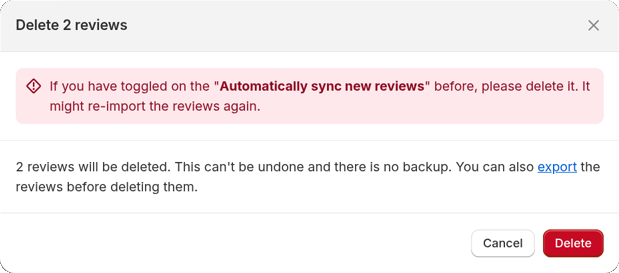
- A window titled Delete 1 review or Delete N reviews opens. It says "N reviews will be deleted. This can't be undone and there is no backup." and has an export link if you want a copy first (Standard or Plus plan). Check the count. The red banner at the top is about auto-sync. See Two things to watch for below.
- If you used Select all N reviews, the window also asks you to type the number in Type N to confirm. Delete stays greyed out until the number matches.
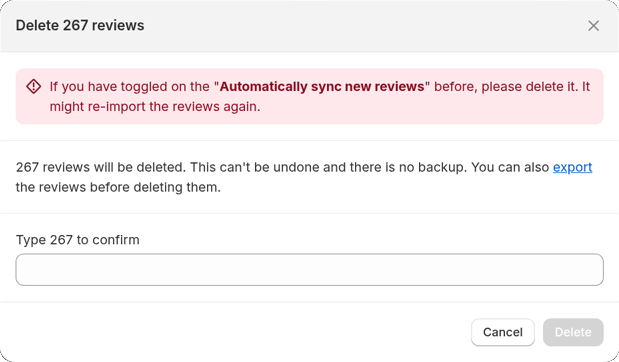
- Click Delete. To keep the reviews, click Cancel.
After you delete:
- The reviews leave your Reviews list right away. Star ratings and review counts on your storefront update shortly after. The review lists in your storefront widgets can take up to an hour to drop them.
- On Free, deleted reviews no longer count toward the 100-review hold limit. Deleting doesn't refund the lifetime marketplace import allowance. See Plans and pricing.
- Discount codes already sent as a reward for a review stay valid.
- WiseReviews keeps a record of each delete (when it happened, how many reviews, and which ones), so Support can tell you what was removed if you ask. The record isn't shown in the app, and it can't bring deleted reviews back.
Two things to watch for:
- Auto-sync can bring reviews back. The red banner in the window warns that if you turned on Automatically sync new reviews when you imported these reviews, that sync might import them again. Before you delete, go to Reviews, open More actions, click Synchronized reviews, select that URL, and click Delete (or Pause). See Automatically sync new reviews.
- If the window says the number of matching reviews changed, new reviews arrived or others were removed while it was open. Close it, let the list refresh, and check the new count before deleting.
Delete review photos and videos
To keep a review but remove its photos and videos:
- Select the reviews on the Reviews page.
- Click the ... button at the end of the action bar, then click Delete media.
- In Delete review media, click Delete.
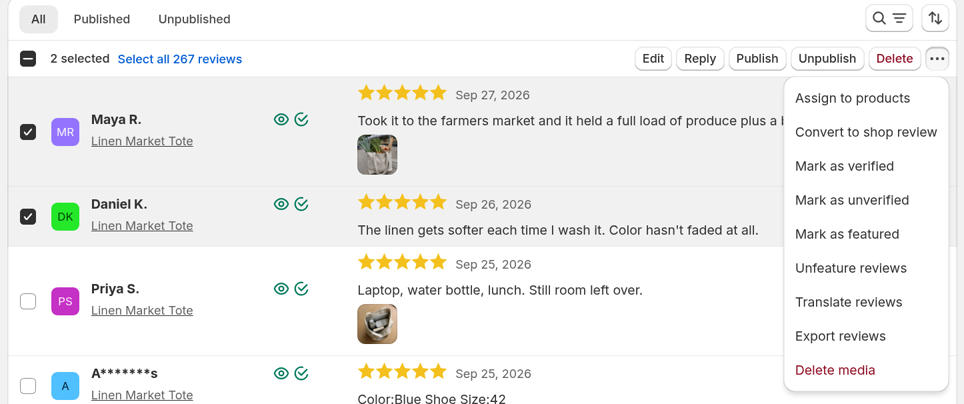
This can't be undone. The reviews themselves stay as they are.
Create a review manually
Collected reviews outside the app, for example over email or social media? You can add them by hand:
- On the Reviews page, click Create review. If you don't see the button, message us from the chat widget and we'll unlock review management for your shop. See Unlock Create review and Edit above.
- Click Pick products and select up to 5 products (or leave products empty for a shop review). Picked products appear as removable tags. The footer shows how many you have selected, like
2/5 products selected. After you pick some, the button reads Change products. - Set the rating and write the review body.
- Optionally add a title, the reviewer's name and email, the review date, photos or videos, and the verified mark.
- Choose Published or Unpublished, then click Save.
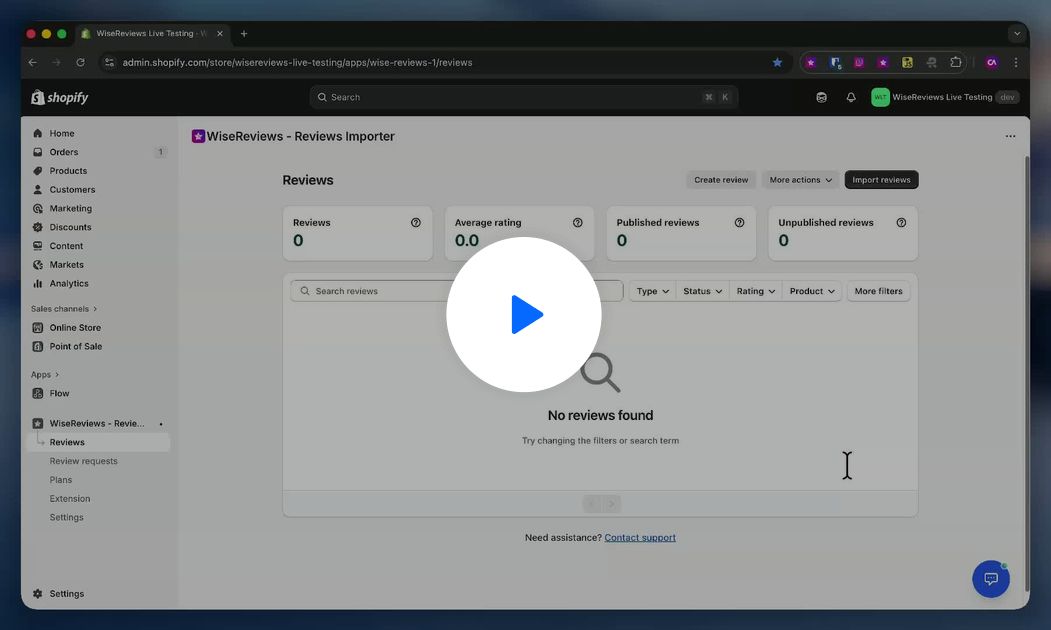
Photo and video upload limits
Photos and videos are added one file at a time, and each file must be 3 MB or smaller after processing.
WiseReviews shrinks images for you before uploading (down to 1000 pixels wide), so a photo straight from a phone almost always fits. Videos are uploaded as they are, so a long clip may need trimming or compressing first.
Accepted file types:
| Media | Formats |
|---|---|
| Images | JPG, PNG, GIF, BMP, WEBP, SVG |
| Videos | MP4, WEBM, OGG |
Two messages tell you which rule you hit:
- "File size must not exceed 3 mb." means the file is a supported type but too big.
- "File type not supported. Please upload a valid file." means the format isn't in the list above. A MOV or HEIC file from an iPhone is the most common case; convert it to MP4 or JPG first.
The reviewer photo works a little differently: it is shrunk to a small thumbnail before uploading, so its size is almost never a problem. It accepts the same image formats.
Understanding review types
WiseReviews has two kinds of reviews:
- Product reviews belong to one or more products (up to 5) and appear on each of those product pages. Edit, reply, and publish apply to the same review on every product. There are no duplicate copies.
- Shop reviews are about your store as a whole (shipping, service, overall experience). They appear in the Shop reviews tab of the Product Reviews widget.
You can switch a review between the two at any time with Assign to products and Convert to shop review.
Exporting reviewer data
Need your reviewers' names and emails, for example to import customers into Shopify? Exporting reviewer data needs the Standard or Plus plan. On Free, clicking Send email shows the error "This is not allowed in your current plan. Please upgrade your plan." See Plans and pricing.
- Go to Reviews, open More actions, and click Export reviewer data.
- Confirm the Email address and click Send email.
The reviewer data file is emailed to you. Exports use UTF-8 with a BOM so Excel opens accented characters correctly.
Still stuck? Message us from the chat widget and we'll help.