Import reviews with the Chrome extension
Amazon, Shopee, Shein, and Temu are CAPTCHA-protected, so our server can't fetch their reviews directly. The WiseReviews Chrome extension solves this: it imports reviews straight from the product page in your browser.
If you paste a URL from one of these sites into the normal import form, you'll see "Please use the Chrome extension to import from this website" and be taken to the Extension page.
Prerequisites
- Google Chrome (or a Chromium browser that supports Chrome extensions).
- Reviews from other sources (like AliExpress or Etsy) don't need the extension. See Import reviews from AliExpress and other marketplaces.
Step 1: Install the extension
- In WiseReviews, go to Extension.
- Click Install now. This opens the WiseReviews extension on the Chrome Web Store.
- Click Add to Chrome.
Step 2: Copy your Extension app key
- On the Extension page in WiseReviews, find the Extension app key field. Click the eye icon to reveal it, or the copy icon to copy it.
- Keep this key ready. You paste it into the extension in the next step, after you open a supported product page.
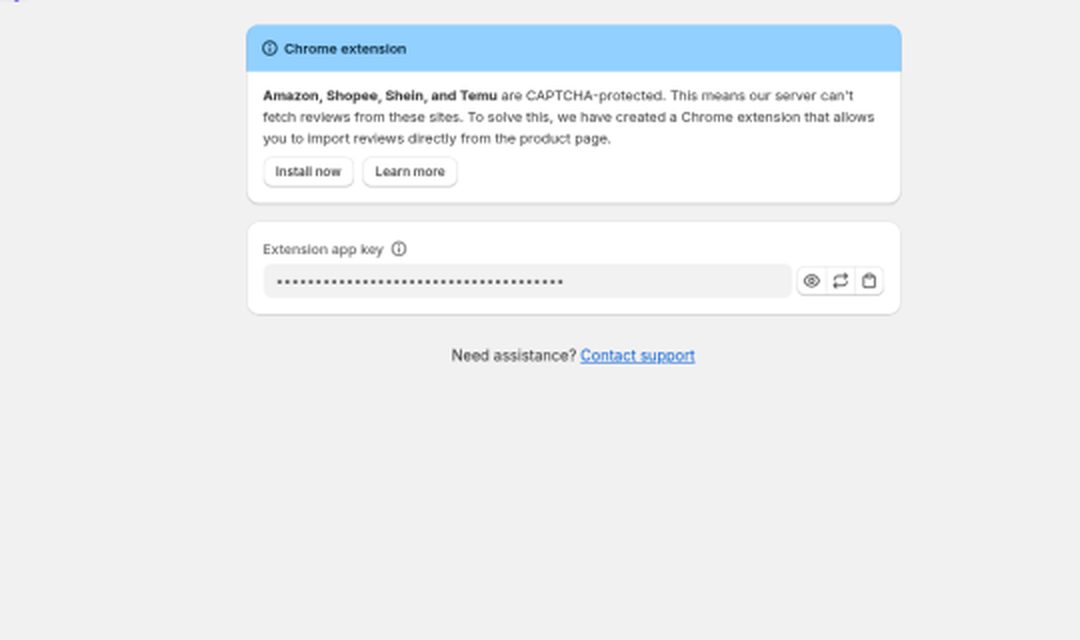
If you ever need a new key (for example, if you shared it by accident), click the refresh icon to regenerate it. The old key stops working immediately.
Step 3: Open a product page and import
The Extension app key field, Product picker, and Import reviews button only appear when the extension popup is open on a supported Amazon, Shopee, Shein, or Temu product page. On any other page (or a new tab), the popup shows only a list of those four sites. Click one to open that site, then go to the product page you want.
- In Chrome, open the product page on Amazon, Shopee, Shein, or Temu whose reviews you want.
- Click the Wise Reviews extension icon to open the popup.
- Paste your key into Extension app key.
- Under Product, leave it as Shop reviews (empty) to import as shop reviews, or click it and pick the matching product in your store.
- Optionally turn on Skip already imported reviews or Set max reviews.
- Click Import reviews. The extension first checks that your app key is valid and that your plan still allows imports. If you are at a limit or the key is wrong, you see that error right away (with an Upgrade plan button when the limit is the problem), and the page is not scraped.
On Amazon and Shein, the first click of Import reviews may redirect you to that product's reviews page. That is expected. Wait for the page to load, then click Import reviews again.
The extension still picks one product per import when you choose a product. To put those reviews on more products afterward (up to 5), select them on the Reviews page and use Assign to products. See Manage your reviews.
When a CAPTCHA or security check blocks the page, the extension names that clearly instead of saying no reviews were found. Errors also point you to CSV upload or Get help when that is the better next step.
The imported reviews appear on your Reviews page, with Extension as their source. On extension version 1.7.0 or later, a successful import also shows See your reviews in Wise Reviews, which opens the WiseReviews admin so you can manage them next. Prefer a walkthrough? Watch the video tutorial.
If you are on Free and these are your first imported reviews, Home may also show a next-steps card (manage reviews, install widgets, try an in-app import, or upgrade). See Get started with WiseReviews.
Import limits
Extension imports count toward the same plan limits as marketplace URL imports: how many reviews you can hold (published and unpublished), and (on Free) the lifetime marketplace import allowance of 300. Deleting reviews does not refund the lifetime allowance.
When you hit a Free plan limit from the admin app, a warning banner with Upgrade plan appears on the Dashboard, Reviews, and import modals. Full details in Import reviews from AliExpress and other marketplaces.
Still stuck? Message us from the chat widget and we'll help.