New features, improvements, and fixes in WiseReviews.
#
Fix: stray template code in the email editor preview
fixed
In the review request Email editor, clicking the eye icon to preview no longer shows stray template code at the edge of the email. The products section now shows a sample product with its name, image, and button.
#
Fix: AliExpress short links import the right product
fixed
AliExpress short links (a.aliexpress.com and s.click.aliexpress.com) pasted into Import reviews, a CSV import, or auto-sync now import reviews for the product they point to, the same as the full product link.
The warning in the import window that rejected short links is gone.
An expired short link now shows a clear message asking for the full product link, instead of saying no reviews were found.
#
Fix: no blank product image in review request emails
fixed
Review request emails now leave out the product image when a product has none, so real sends, test emails, and the Preview card no longer show a blank or broken image.
When your newest product has no image, the Email editor shows a grey placeholder picture instead of an empty box.
#
Fix: the blacklisted words filter holds the right reviews
fixed
With Unpublish reviews containing blacklisted words turned on, a review submitted on your storefront is held as Unpublished when its title or text contains one of your blacklisted words.
Matching ignores capitalization and catches the word inside longer words, so "crap" also holds reviews with "CRAP" or "Crappy".
Clean reviews, with or without a title, publish as before, following your Autopublish new reviews selection. Previously, clean reviews without a title were sometimes held by mistake, and some reviews containing a blacklisted word still went live.
Reviews held before this update keep their current status. You can publish them manually from Reviews. See Moderate new reviews automatically.
#
Old orders no longer trigger a burst of review requests
fixed
When WiseReviews picks up older orders (for example after you turn on review requests, or when past orders are imported into Shopify), it no longer schedules requests that are already past their send date.
An order is skipped when its purchase (or fulfillment, with Fulfillment timing) was more than 2 days ago and your chosen wait is already over. Customers from old orders are no longer emailed all at once.
Requests that are already scheduled are not changed.
WiseReviews has a new look. The whole app is rebuilt on Shopify's latest admin components, so it feels like the rest of your Shopify admin and works well on phones.
Faster pages. Pages you have already visited open instantly with your last data, then refresh in the background.
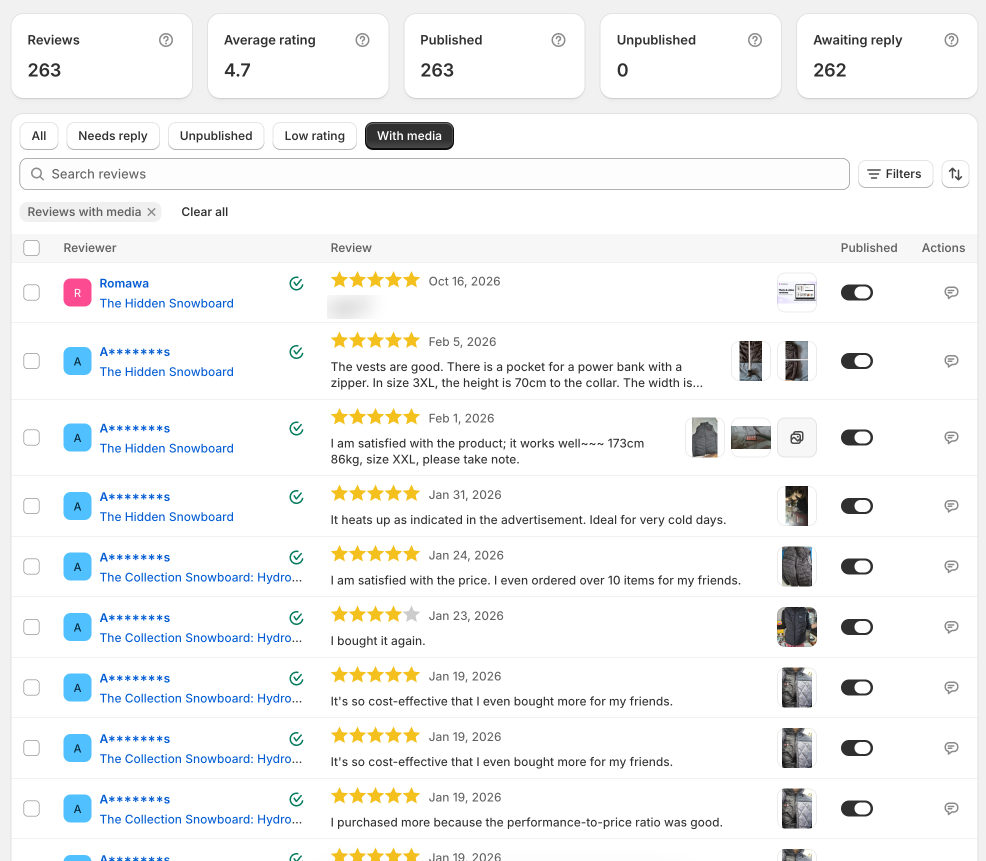
Redesigned Reviews page. Each row has a Published switch, photos and videos sit beside the text so rows are shorter, and a new filter bar puts search, Filters, and sort in one place. Selecting all reviews and clearing a selection are faster too. See Manage your reviews.
Clearer import help. Under Number of reviews, the import form now tells you how many reviews it found and what your plan allows, for example "250 of 300 reviews found will be imported from Lazada" and "Your plan allows 120 more".
New Dashboard metrics. See reviews added this month, your average rating, reviews awaiting a reply, whether your widgets are installed, and a 6 month chart. On the Free plan, a first import card replaces next steps until you dismiss it. See Get started with WiseReviews.
Redesigned Plans page. A Monthly and Yearly switch, aligned plan cards, and the Standard plan highlighted. See Plans and pricing.
Auto-sync switch. Each row on Synced sources has its own Auto-sync switch to pause or resume that URL. See Automatically sync new reviews.
Phone layouts. Every table and page now fits a phone screen.
Fixed "too many requests" errors that could appear while an import was running.
Copy is updated in all 8 app languages.
#
Fulfillment review requests are scheduling again
fixed
Review request emails for shops that use Fulfillment timing are being scheduled again.
Every connected shop is now covered by the regular background sync.
Send dates are now counted from the order's fulfillment date.
In the Edit form, Choose language now translates the title and text, saves the review right away, and keeps the original wording, so Restore original text can bring it back.
If you have unsaved changes to the title or text, Choose language is greyed out with the hint "Save your changes before translating."
In the create form, Choose language now translates the title and text together, for one credit.
Restore original text now asks you to confirm first. Edits made after translating are still lost when you restore.
#
Translations keep the original, with Restore original text
improved
Translating reviews now saves each review's original wording. Select reviews, click the ... button in the action bar, and click Restore original text to bring it back. Restoring doesn't use credits.
The review title is now translated along with the body, for the same one credit per review.
Translating a review again translates from the saved original, not from the earlier translation.
The Translate reviews window now warns that translating replaces each review's title and text, and that each review uses 1 credit, including reviews you translate again.
Reviews translated before this update have no saved original to restore.
Every shop can now delete reviews from the Reviews page. Select the reviews and click Delete in the action bar. You no longer need to message us to turn it on.
Delete media under More actions works the same way. It removes the photos and videos and keeps the reviews.
Before anything is removed, a Delete N reviews window shows the count. When you select every matching review, you type that number to confirm.
Deleting is permanent and there is no backup, so export reviews first if you might want them later. Exporting needs the Standard or Plus plan.
On Free, deleting frees room under the 100-review limit. The limit banner now always suggests deleting some reviews or upgrading.
Create review and Edit still need to be unlocked. Message us from the chat widget and we'll turn them on for your shop.
#
Fix: storefront ratings stuck on very large catalogs
fixed
Very large catalogs (tens of thousands of products with reviews) could exceed Shopify's size limit for storefront review data, so ratings stopped updating on your store.
WiseReviews now trims the least-reviewed products from that storefront payload until it fits.
Your shop-wide review summary still counts every review. Trimmed products show on the storefront like products with no reviews yet.
#
Fix: marketplace imports only accept real marketplace links
fixed
Marketplace imports now accept only real marketplace domains (and matching regional sites). Look-alike hosts and mismatched source/URL pairs are refused before any fetch.
Invalid links get a clear message that the URL is not from the selected marketplace.
#
Review request links open the write-a-review form
improved
Review request emails append ?wise_review=write to each product link so the storefront widget opens the write-a-review form (scrolls under a sticky header, focuses the name field, and shows the Product reviews tab).
The form still opens even if you hide the widget when a product has zero reviews.
Existing templates that use the product URL merge tag get this automatically.
On Standard or Plus, when a marketplace URL has no reviews, you can tick Automatically sync new reviews and click Save auto-sync to save it as a Pending sync URL (one-time import of zero reviews is still refused).
On Plus Multiple URL import, a zero-review row with auto_sync_import set to 1 is saved the same way instead of being skipped.
Extension-only sources (Amazon, Shopee, Shein, Temu) still cannot be saved this way.
One review can sit on up to 5 products. It stays a single row; edit, reply, and publish apply on every product.
Bulk action is now Assign to products. Create, edit, and import use Pick products with removable tags and a count/5 footer.
Reviews list and auto-sync show N products when a review or synced URL has more than one. CSV import and export support comma-separated handles (max 5).
Deleting a Shopify product moves reviews and sync URLs onto remaining products; they are unpublished only when nothing is left.